Want to check the flow of your ideas at a glance?
The slide sorter is your best ally to get a global vision and organize your presentation with ease. No more endless scrolling in the sidebar!
Turn on the Slide Sorter view
To switch to this panoramic view, you have two ultra–fast methods:
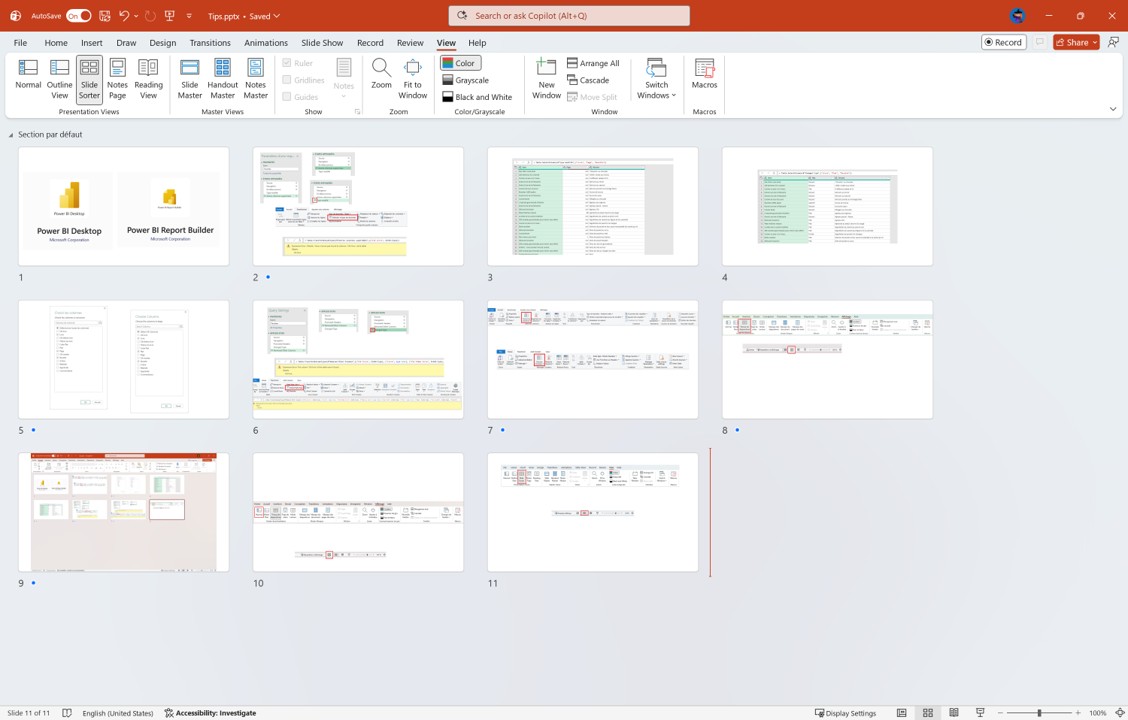
1/ Via the ribbon: Go to the View tab and click on Slide Sorter.

2/ The magic shortcut: Click on the “four small squares“ icon in the status bar, at the bottom right of your window.

Organize like a pro
Once in sorter mode, you regain full control over your structure:
- Rearrange with a gesture: Click and drag your slides to change their order instantly.
- Manage groups: This is the perfect place to add Sections (right–click between two slides) to chapter your densest presentations.
- Misty Tip: Hold down the Ctrl key to select and move multiple slides at once!
Quick return to normal view
Is your plan ready? To resume editing your content, nothing could be simpler:
1/ Classic method: In the View tab, click on Normal.

2/ Quick method: Click on the “slide“ icon in the bar at the bottom right, right next to the sorter.

3/ Even simpler: Double–click directly on any slide to open and edit it!
Tip: Use the zoom slider in the bottom right to adjust the number of slides visible on the screen. This is perfect for checking the visual balance of your entire deck!