Misty’tips notifications constantly fall into the spam folder? And do you mind missing the great tips of the day 😉?
Outlook often gets a little overzealous and moves important messages to the Junk Email (Spam) folder.
To prevent our Microsoft 365 tips from getting lost, the solution is simple: add the sender to your whitelist.
Find out in 3 quick steps how to set up your email so you never miss a Misty‘tips notification again!
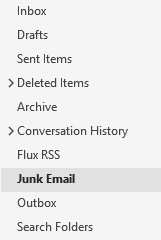
First, find the email in the Junk Email folder.
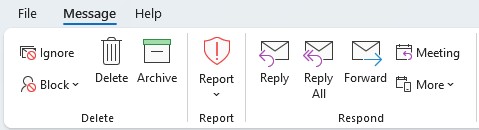
Then, open the email. On the Message menu, click Block.
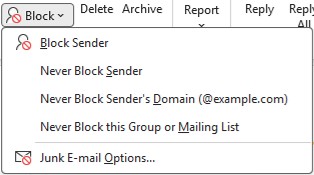
In the menu that appears, click Never Block Sender.
💡Even better: click on Never Block Sender‘s Domain to receive all emails from MistyTips & co, without exception.
There you go! With just a few clicks, you‘ve tamed Outlook‘s spam filter. You can finally smile again: every tip will now arrive directly in your inbox, ready to read!
Was this tutorial helpful? Don‘t hesitate to share it with your colleagues who are also fighting against disappeared emails. Misty‘tips is here to help you simplify your Microsoft 365 use every day!