

Want to calculate the difference between two dates in Excel in days, months, or years?
The DATEDIF function allows you to calculate the difference between 2 dates in days, months or years.
It works as follows:
=DATEDIF(start_date, end_date, unit)
The units are coded as follows:
- “y“: Difference in years
- “m“: Difference in months
- “d“: Difference in days
- “ym“: Difference in months, after subtracting years
- “yd“: Difference in days, after subtracting years
- “md“: Difference in days, after subtracting years and months
Examples of how this feature can be applied:
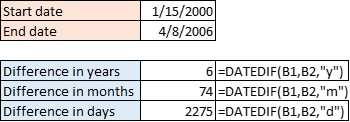

This function is special because although it has been around for a long time, it is not referenced by Excel and therefore cannot be used via the fx function help.