

Presenting to a non-English speaking audience? PowerPoint can translate your words in real time, helping your message stand out and resonate, no matter the language.
When you present in Slide Show mode, you can display your speech as subtitles.
This can be in the same language (for accessibility) or in another language (with automatic translation).
Enabling subtitles
In the Slide Show menu, check Always Use Subtitles.

Now, when you launch your presentation in Slide Show mode, the presenter’s speech will be captioned.
In the following example, I started the slideshow by saying “Hello” and had the subtitles translated into French.

Subtitle Settings
To set up subtitles, in the Slide Show menu, click Subtitle Settings.

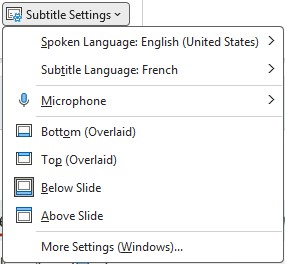
You can set up:
- The spoken language
- The subtitle language
- The microphone used
- The position of subtitles
- Bottom (on the slide)
- Top (on the slide)
- Below the slide
- Above the slide
Note: For the transcription or translation to work well, the presenter must speak clearly.
You also need to configure the spoken language and the microphone used.
The translation engine is the same one used for document translation.
Subtitle style options (size, color, contrast) depend on Windows accessibility settings and are not configurable directly in PowerPoint.