

Do you want to make your pivot table filters more dynamic and easier?
In a pivot table, it is sometimes convenient to make the filters dynamic and easily accessible. 2 options are available to you:
Add a slicer to a PivotTable
Slicers allow you to display a clickable list to choose its filters.
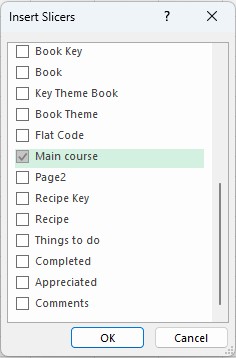
To do this, click your PivotTable, and then on the PivotTable Analyze menu, click Insert Slicer.

Select the field(s) for which you want to apply a dynamic filter.
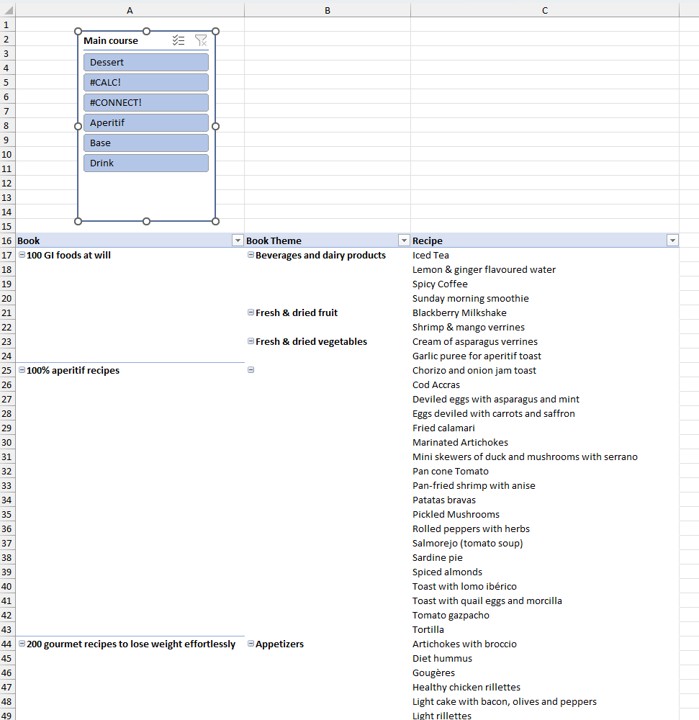
A new area is inserted into your table. Place it wherever you want.
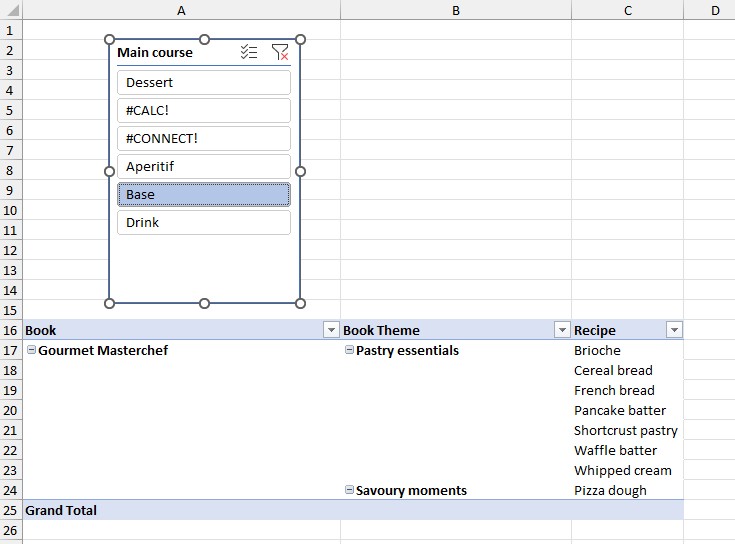
Click on the item of your choice and the pivot table will reflect the chosen filter.
You can select multiple filter items, by clicking on the icon below.

To remove all filters, click on the icon below.

Add a timeline to filter by date
Similarly, it is possible to add dynamic filters based on dates.

This inserts a timeline area with dates, which you can place wherever you want.

In this timeline, you can select the time periods that you want and this will adjust your pivot table.

You can use slicers and timelines on a table (excluding pivot tables). To do this, you must first have format as table.

Segments and timelines are powerful tools for fine–tuning the analysis of your data in Excel. By mastering them, you gain clarity and efficiency.